6.10. DataFrame Indexing
~- logical not&- logical and|- logical or^- logical xor
Pandas Select Methods:
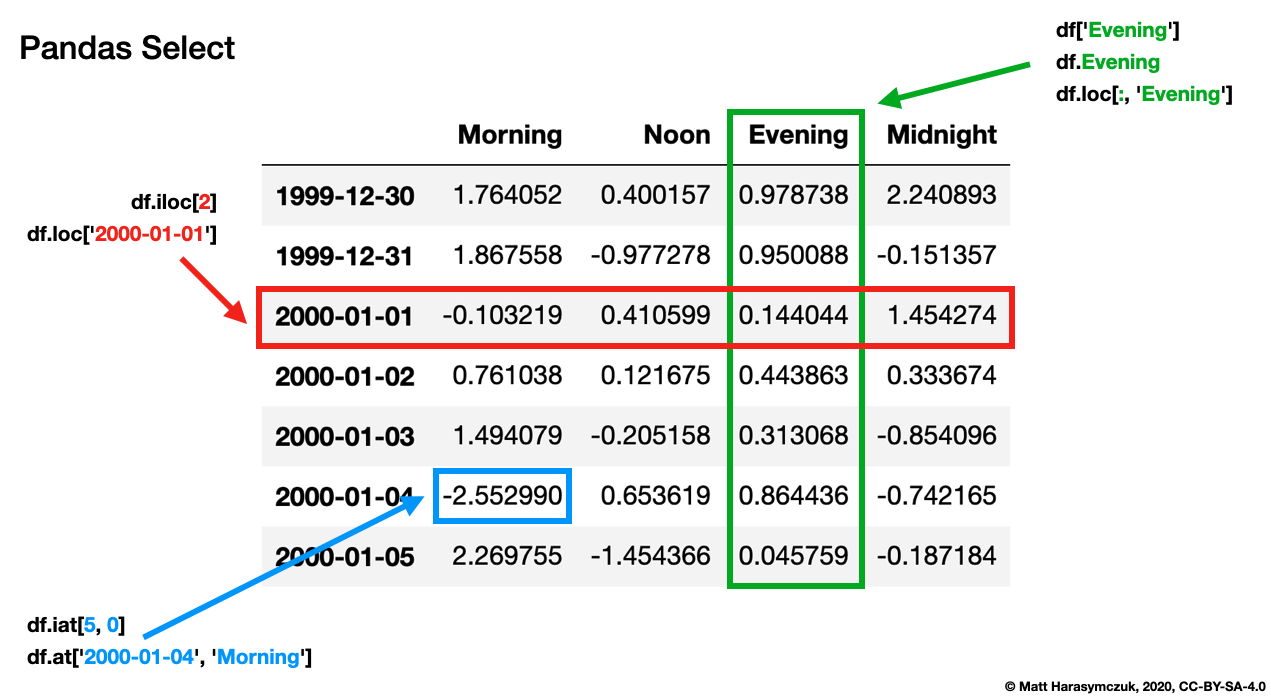
6.10.1. SetUp
>>> import pandas as pd
>>>
>>> df = pd.DataFrame([
...     {'firstname': 'Alice', 'lastname': 'Apricot', 'age': 30},
...     {'firstname': 'Bob', 'lastname': 'Blackthorn', 'age': 31},
...     {'firstname': 'Carol', 'lastname': 'Corn', 'age': 32},
... ], index=['a', 'b', 'c'])
>>> df
  firstname    lastname  age
a     Alice     Apricot   30
b       Bob  Blackthorn   31
c     Carol        Corn   32
6.10.2. Mask
df.column- select a columndf['column']- select a columndf.loc[:, 'column']- select a column
>>> df.firstname == 'Alice'
a     True
b    False
c    False
Name: firstname, dtype: bool
>>> df['firstname'] == 'Alice'
a     True
b    False
c    False
Name: firstname, dtype: bool
>>> df.loc[:, 'firstname'] == 'Alice'
a     True
b    False
c    False
Name: firstname, dtype: bool
6.10.3. Query
mask = df['firstname'] == 'Alice'- create a querydf.loc[mask]- select rows where column is less than value
>>> alice = df['firstname'] == 'Alice'
>>> alice
a     True
b    False
c    False
Name: firstname, dtype: bool
>>> df[alice]
  firstname lastname  age
a     Alice  Apricot   30
>>> df.loc[alice]
  firstname lastname  age
a     Alice  Apricot   30
6.10.4. Logical NOT
~mask- logically invert the mask
~0 -> 1
~1 -> 0
>>> alice = df['firstname'] == 'Alice'
>>> ~alice
a    False
b     True
c     True
Name: firstname, dtype: bool
>>> df[~alice]
  firstname    lastname  age
b       Bob  Blackthorn   31
c     Carol        Corn   32
>>> df.loc[~alice]
  firstname    lastname  age
b       Bob  Blackthorn   31
c     Carol        Corn   32
6.10.5. Logical AND
In first and in second query
1 & 1 -> 1
1 & 0 -> 0
0 & 1 -> 0
0 & 0 -> 0
>>> alice = df['firstname'] == 'Alice'
>>> apricot = df['lastname'] == 'Apricot'
>>>
>>> df[alice & apricot]
  firstname lastname  age
a     Alice  Apricot   30
>>>
>>> df.loc[alice & apricot]
  firstname lastname  age
a     Alice  Apricot   30
6.10.6. Logical OR
In first or in second query
1 | 1 -> 1
1 | 0 -> 1
0 | 1 -> 1
0 | 0 -> 0
>>> alice = df['firstname'] == 'Alice'
>>> bob = df['firstname'] == 'Bob'
>>>
>>> df[alice | bob]
  firstname    lastname  age
a     Alice     Apricot   30
b       Bob  Blackthorn   31
>>>
>>> df.loc[alice | bob]
  firstname    lastname  age
a     Alice     Apricot   30
b       Bob  Blackthorn   31
6.10.7. Logical XOR
In first or in second, but not in both queries
1 ^ 1 -> 0
1 ^ 0 -> 1
0 ^ 1 -> 1
0 ^ 0 -> 0
>>> alice = df['firstname'] == 'Alice'
>>> bob = df['firstname'] == 'Bob'
>>>
>>> df[alice ^ bob]
  firstname    lastname  age
a     Alice     Apricot   30
b       Bob  Blackthorn   31
>>>
>>> df.loc[alice ^ bob]
  firstname    lastname  age
a     Alice     Apricot   30
b       Bob  Blackthorn   31
6.10.8. Assignments
# %% About
# - Name: DataFrame Select
# - Difficulty: easy
# - Lines: 5
# - Minutes: 3

# %% License
# - Copyright 2025, Matt Harasymczuk <matt@python3.info>
# - This code can be used only for learning by humans
# - This code cannot be used for teaching others
# - This code cannot be used for teaching LLMs and AI algorithms
# - This code cannot be used in commercial or proprietary products
# - This code cannot be distributed in any form
# - This code cannot be changed in any form outside of training course
# - This code cannot have its license changed
# - If you use this code in your product, you must open-source it under GPLv2
# - Exception can be granted only by the author

# %% English
# 1. Load data from `DATA` as `df: pd.DataFrame`
# 2. Select rows where 'petal_length' is above 2.0
# 3. Display first 5 rows
# 4. Do not use `.query()`
# 5. Run doctests - all must succeed

# %% Polish
# 1. Wczytaj dane z `DATA` jako `df: pd.DataFrame`
# 2. Wybierz wiersze, gdzie wartość 'petal_length' jest powyżej 2.0
# 3. Wyświetl 5 pierwszych wierszy
# 4. Nie używaj `.query()`
# 5. Uruchom doctesty - wszystkie muszą się powieść

# %% Expected
# >>> result  # doctest: +NORMALIZE_WHITESPACE
#    sepal_length  sepal_width  petal_length  petal_width     species
# 1           5.9          3.0           5.1          1.8   virginica
# 2           6.0          3.4           4.5          1.6  versicolor
# 3           7.3          2.9           6.3          1.8   virginica
# 4           5.6          2.5           3.9          1.1  versicolor
# 6           5.5          2.6           4.4          1.2  versicolor

# %% Doctests
"""
>>> import sys; sys.tracebacklimit = 0

>>> assert sys.version_info >= (3, 9), \
'Python has an is invalid version; expected: `3.9` or newer.'

>>> pd.set_option('display.width', 500)
>>> pd.set_option('display.max_columns', 10)
>>> pd.set_option('display.max_rows', 10)

>>> assert 'result' in globals(), \
'Variable `result` is not defined; assign result of your program to it.'

>>> assert result is not Ellipsis, \
'Variable `result` has an invalid value; assign result of your program to it.'

>>> assert type(result) is pd.DataFrame, \
'Variable `result` has an invalid type; expected: `pd.DataFrame`.'

>>> result  # doctest: +NORMALIZE_WHITESPACE
   sepal_length  sepal_width  petal_length  petal_width     species
1           5.9          3.0           5.1          1.8   virginica
2           6.0          3.4           4.5          1.6  versicolor
3           7.3          2.9           6.3          1.8   virginica
4           5.6          2.5           3.9          1.1  versicolor
6           5.5          2.6           4.4          1.2  versicolor
"""

# %% Run
# - PyCharm: right-click in the editor and `Run Doctest in ...`
# - PyCharm: keyboard shortcut `Control + Shift + F10`
# - Terminal: `python -m doctest -f -v myfile.py`

# %% Imports
import pandas as pd

# %% Types
result: pd.DataFrame

# %% Data
DATA = 'https://python3.info/_static/iris-clean.csv'

# %% Result
result = ...